
Linux: Still too hard for the average user?
Jan 10, 2026
By Robert Walsh
I've been a Windows user since the days of Windows 3.1 in the early 1990s. As new Windows versions came out, I moved with them. Windows 95, 98, ME, 2000, XP, 7, 8, and 10 - I've used them all!
I began using Mac OS when Leopard was released in 2007. I didn't really switch from Windows to Mac OS. Instead, I used both. For some tasks like software development on the Windows-only applications on which I was working at them time, I still needed Windows. For general day-today work, though, I mostly used the Mac. Until recently, I was using a Windows desktop, but I travel with a Mac Book Pro.
Things on both Windows and Mac have historically "just worked." An average user can boot up either operating system and expect their devices and applications to function as advertised. Some things might be Windows or Mac only, but that's less of an issue now than it was in the past. Sure, there'll be a learning curve when moving from Windows to Mac or vice versa, but it isn't too hard to overcome.
This began to change, though, when Mac OS first dropped support for 32-bit applications and then switched from Intel to their own M* processors. Suddenly, older software and hardware no longer "just works."
Windows has been somewhat better on this front, but that, too, is changing with Windows 11. Microsoft has made a decision to prevent Windows 11 from being installed on older hardware. I'm not talking decades-old decrepit machines. Computers that were new just a few years ago lack the components necessary, specifically something called the Trusted Platform Module or TPM, to allow Windows 11 to be installed (without some very technical hacks and workarounds).
Making the switch
So, when my everyday Windows 10 computer begin to behave erratically and unreliably, I decided to take the plunge and switch to Linux. Linux is an open-source general purpose operating system alternative. It can do anything Windows or Mac can do, but perhaps with different applications or workflows. (Technically, Linux refers only to the kernel of the operating system, but that's a semantic distinction and generally unimportant when discussing Linux.)
I listen to numerous podcasts where the hosts explain how Linux is finally ready for the mainstream and that only a few, fairly niche applications do not have suitable alternatives available. My main goal was to make it faster to record, edit, and publish the video content we create to teach STEM subjects. I also planned to virtualize my existing Windows computer so that I could still use it inside the new machine.
To be fair, I did not seek out Linux-friendly hardware. I bought a refurbished gaming computer with lots of RAM, several CPUs, and an Nvidia GPU. I'd read that the Pop OS! distribution (or "distro") has some of the best support for Nvidia graphics cards, something with which many other distros struggle. Plus, I was excited about experimenting with the tiling features built into the Cosmic desktop.
After working through some initial hardware issues with the video card that were (probably) resolved by simply reseating the GPU (I guess it wiggled loose in shipping), Pop OS! installed smoothly. I was feeling pretty good!
Maintaining a safety net
I moved on to creating a virtual version of my Windows computer. I decided to use Virt Manager because I've read it is much faster than Oracle's Virtual Box due to the way it integrates with the system kernel. I had made an image of the main hard drive using Clonezilla, and I was able to boot Clonezilla from a USB drive running Ventoy and restore the image. The original machine had a second SATA SSD hard drive (assigned to drive letter E:), so I mounted it physically in the new machine. I installed Samba, configured it to share the drive's mount point, and added a permanent drive map within Windows.
My Google Drive sync had been installed on the Windows E: drive, and it wasn't happy with it as a network share. Therefore, I had to move the index to the C: drive. Not a big deal, but an annoyance nonetheless. Is there an actual technical reason why the Google Sync program cannot put its index on a network share?
Regardless, the Windows machine was installed as a virtual machine and accessible from Pop OS!. Performance within the virtual machine isn't what I hoped it would be, but everything is working. Everything, that is, except Windows Task Manager. For some reason, after installing the VirtIO Guest Tools inside the VM, The Task Manager view no longer updates. It loads, but the display is static on every tab. Searching for ways to resolve this problem is challenging since terms like "Task Manager", "display", and "update" are so generic that there are MANY unrelated hits in the results.
On the plus side, USB redirection works really well inside the VM. I teach a robotics class, and the software used to manage the robot is Windows-only. I tried installing it on Pop OS! through Wine and Bottles, but it doesn't work. Not sure why, but what I've read suggests it's a problem with low-level access to the robot using USB. Even so, the software runs in the VM and is able to access the redirected USB port.
The overall state of things
Printers and scanners
My Neat Desktop Scanner (an older ND1000), too, doesn't work in Pop OS!. It shows up in the list of connected USB devices, and it claims to be TWAIN compliant, but I haven't found an application that can see it. It does work inside the VM with USB redirection, though, and that's good enough for now. Plus, I have an Epson multi-function printer/scanner (an ET 5170) that does work with Cosmic's Document Scanner application.
Speaking of printers, Pop OS! detected both my network-attached Brother Black and White laser (an HL 2405W) and the Epson color printer, and both work well from Linux applications. I was even able to find a Linux driver for a CTP800D thermal label printer, and it works better from Linux than it did with Windows. However, Google Chrome (and its open-source cousin Chromium) loses its connection to the printers each night. I can print as much as I want to any of the three during the day, but if I leave the browser open overnight and return the next day, the only print option available is Save as PDF. If I click the Print Using System Dialog from the browser's print dialog, I can see these printers, but each shows only Getting Printer Information when I click on it. Closing and reopening the browser fixes this issue. I can, though, print from other applications while the browser is unable to access the printers.
Remote access
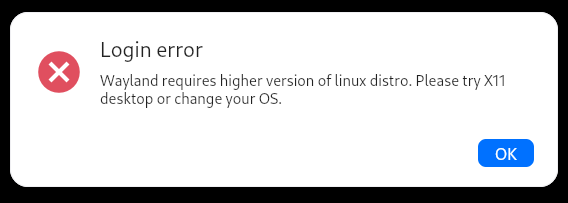
I have lots of other computers and virtual machines in my home office network, and I'm able to access almost all of them remotely (mostly through the remote desktop protocol or RDP). Remote access through Wayland, a replacement for the X windowing system and what is used by Cosmic, is still a work-in-progress. I was unable to get either VNC or RDP working. I also tried RustDesk which claims to have experimental support for Walyland, but even though the client launches without crashing the computer (something that happened with VNC!), I'm unable to connect from another computer. I thought it might be a firewall issue, but the connecting computer gives a rather generic error about not being able to connect even after opening what I think is the necessary port.
Update: The original problem with RustDesk was that I hadn't opened enough ports in the firewall. After doing that, I was able to make an initial connection, but I immediately saw a message indicating that I needed to select a screen to share on the remote peer! Definitely not helpful when trying to access my home computer from some other location. Regardless, upon dismissing that message, I got another saying that RustDesk won't work with my distro and Wayland. Instead, I should switch to the X Window system or use another distro.
Video conferencing
Zoom is an integral part of my daily workflow. There isn't a Zoom client in the Pop OS! repositories or the Cosmic Store, so I installed the unofficial Flatpak version. It works, but not well. Even though I'm using tiled workspaces, the Zoom windows are always floating, and they are always on top of other windows. Also, I'm able to share my screen only once without having to restart the Zoom application! If I stop sharing and try to reshare in the same meeting, or if I finish one meeting where I shared my screen and start another without closing and relaunching the client, the screen share is nothing but a black window. I haven't yet experimented with Zoom's own native Linux client because it cannot be installed via a repository and doesn't get automatic updates. I suppose I will, though, because better screen sharing and integration with my tiling workflow would be preferable to manual updates.
I know there are other video conferencing options, but Zoom integrates with our online learning platform. Google Meet does, too, and I haven't tried that yet. However, switching to another third party system isn't really an option.
Another very important application for me is email. Like most Windows users, I was using Outlook. On Linux, I installed Thunderbird, and I was pleasantly surprised with how easy it was to get my Office365 accounts configured! I had some initial issues with folder syncing, and I still have two Sent Items folders and two Junk folders. Messages created on Thunderbird stay in the Drafts folder on other devices where I continue to use Outlook. I'm still getting used to the tabbed interface, and I'm struggling a bit with the text and background colors in new messages while using dark mode. I've sent at least one that shows up for the receiver as white on white. This seems most problematic when pasting text copied from either a previously sent message or from a web page where the editor attempts to retain the formatting.
Uninterruptible power supply
The last point I'll make about my own set up is that I have an APC uninterruptible power supply (UPS) with a USB monitoring interface. While Pop OS! can see the device, I was unable to get the Network UPS Tools (NUT) server to connect to it. I get an error about not having the appropriate permissions. I've seen many other people reporting the same or similar errors, but nothing I've tried resolved my problem. Ultimately, I gave up on that for now.
A story from another user
I have one more related story to share. One of our subscribers was trying to complete the Coffee Break project in Content Library Jr. She had purchased a Raspberry Pi 4 and the electronics kit needed for the project, but the Pi she bought didn't come with a preloaded SD card. She reached out for help, and we pointed her to instructions for using the Raspberry Pi Imager application to prepare an SD card to install Raspbian, a Linux-based operating system for Raspberry Pis
She bought a two pack of micro SD cards, and when trying to write to the first, the Imager just hung. Perhaps the card was bad. She had better luck with the second, but it didn't boot when she inserted it into the Pi. We sent a brand new Raspberry Pi 5 kit with a preloaded card, and it worked out of the box. However, the Python Idle IDE is no longer included in the default operating system image, so the instructions in the lesson (which were written for a Raspberry Pi 3) didn't match what she was trying to do in Thonny, the preferred replacement for Idle. I researched how to install Idle, but the name has changed in the repositories from Idle3 to just Idle, so most of what I found resulted in errors when she tried to do perform the steps. The errors did suggest this might be the case, but for someone non-technical, they weren't clear enough.
In the Coffee Break project, the student uses Python commands to control the GPIO pins on the Raspberry Pi to turn an LED on and off. At some point, she was seeing permissions issues related to Python's GPIO library, and in trying to fix those, we did something to the library that prevented it from working any more. We got it reinstalled only to find that due to differences in the hardware, the standard Python GPIO library won't work on a Raspberry Pi 5. We were not able to resolve this issue, so she is returning the Pi 5 to us, and we are sending her a fully prepped SD card for her Pi 4. She went to a lot of trouble to try to get what was supposed to be preinstalled and configured working to use the GPIO pins, and I hope the preloaded SD card for her Pi 4 allows her and her son to finally complete this project.
Should you switch?
The take away from my experiences and those of our customer is that Linux can be a suitable replacement for Windows or Mac but only if:
- Your hardware is supported by the Linux distro you plan to use
- The software you need every day is available for Linux and works with the distro you plan to use
Hardware support in Linux is better than its ever been. I was very pleased that Pop OS! discovered my two network printers, and they were immediately available. I expected to need to find a specific driver for the label printer, and I was pleased that I did find one that works well. Most of my other USB devices also are working - a web cam, a document camera, and a video capture device. The computer I bought, though, came with a USB wifi and bluetooth adapter that Linux doesn't see, and I was not able to find drivers for it. It's a desktop computer, and I'm using a hard-wired Ethernet connection anyway, so no great loss.
In an age where much of your work might be done using Internet browsers and cloud-based applications, it is very realistic to expect that you can switch to Linux and still be productive. Additionally, some applications work very well natively on Linux, but whether this is the case for any specific application might depend on a number of factors: the distro, your hardware, and whether you are using a Flatpak, a Snap, an ApplImage, or a native application chief among them. Some of the issues I've experienced might not have happened if I was using a distribution with the X Window system, but I wanted strong Nvidia support and the tiled workspaces available in the Cosmic Desktop. I made my choice, and I have to take the good and the bad.
I mentioned at the beginning of this post that one of my primary objectives was a better platform for video recording, editing, and publishing. The combination of Open Broadcaster Studio (OBS), Kdenlive, and Handbrake is definitely faster and more stable than on Windows, and I've been able to automate one of the steps in my workflow to save some time. (However, I had to come up with the automated solution initially to overcome a problem I was experiencing with the Handbrake GUI becoming unresponsive!) I'm using the Flatpak versions of all of these to ensure they are more current than what is available with the native applications.
The big problems with Linux arise when things don't "just work." I've not found a solution for my UPS or my Neat Scanner, and we were unable to find a solution for the Python GPIO library on a Raspberry Pi 5. The Zoom Flatpak works, but with fairly significant issues. Chrome (and Chromium) lose my printers every day. Have I done exhaustive troubleshooting to solve these problems? No, but I'm more technical than the average person, and I've spent a non-trivial amount of time on each one. Will I give up on finding solutions? Probably not, but I cannot spend endless hours researching and experimenting. Will I stick with Linux? For now, yes. The configuration I have is good enough, and I know things like remote access on Wayland will get better with time. I like the tiled workspaces, and I'm learning to do more from the terminal so that I can work effectively remotely using ssh. And I still have access to my old Windows computer as a VM, so I'm not completely stuck if I can't do something on Linux.
My conclusion
I made this switch because I was beginning to have problems on Windows, and I didn't like the direction either Microsoft or Apple was going with their operating systems. My new set up isn't perfect, and I'm probably having to live with as many (or maybe even more) issues than I was having on Windows. I did achieve my main goal of improving my workflow for video creation, and some other things are actually better than before. I feel the process I went through, though, is beyond most who are less technical than I am, especially if they are unwilling to do the research to solve the problems they undoubtedly will face or are unable to understand what their research is telling them to do! In my view, Linux is still too hard for the average user unless someone more technical gets it set up and is available when things go wrong.
Stay connected with news and updates!
Join our mailing list to receive the latest news and updates from our team.
Don't worry, your information will not be shared.
We hate SPAM. We will never sell your information, for any reason.
